

 DOI : 10.17577/
A pull request that looks fine on the screen can still carry a bug that nobody spots until it’s live. Reviewers are busy, diffs are long, and the quiet side effects of a change often hide in files nobody opened. That’s the gap AI code review tools try to close by reading each pull request before it merges and leaving comments right where developers already work.
So the tools below all review pull requests automatically, but they don’t all work the same way. Some read your whole codebase, some come attached to a platform you already use, and some keep things simple on purpose. Well, a quick look at each one will help you see which fits your team.
8 AI Code Review Tools Side by Side
|
Tool |
What it reviews |
Where it runs |
How it reports |
Custom rules |
|
Aikido |
The whole repo for each pull request, plus code quality ratings |
Connects with read-only access |
Inline pull request comments |
Custom and predefined rules |
|
CodeRabbit |
Pull requests, plus the IDE and CLI |
Azure DevOps, Bitbucket, GitHub, GitLab |
Pull request comments and one-click fixes |
Path instructions and guideline files |
|
Greptile |
Pull requests, using a graph of your codebase |
GitHub, GitLab, Bitbucket |
Pull request comments |
Rules written in plain English |
|
Qodo |
Pull requests and the IDE |
GitHub, GitLab, Bitbucket, Azure DevOps |
Pull request findings and IDE feedback |
Rules learned from your code |
|
GitHub Copilot code review |
Pull requests and code in IDEs |
GitHub, plus IDEs |
Review comments with suggested fixes |
Custom instructions |
|
Cursor Bugbot |
Pull request diffs |
GitHub, GitLab, Bitbucket, Azure DevOps |
Pull request comments with fix suggestions |
BUGBOT.md files and team rules |
|
Graphite |
Pull requests inside GitHub |
GitHub |
Comments with one-click fixes |
Rules written in plain language |
|
Sourcery |
Pull requests |
GitHub, GitLab |
Summary, comments and suggested changes |
Not covered here |
What to Look at Before Choosing
So what should you weigh before choosing a tool? Here are the points that matter most:
- How much code it reads: some tools stick to the changed lines, while others look at the whole repository and related repos.
- Where it fits your Git setup: GitHub alone is enough for some teams, while others also need GitLab, Bitbucket or Azure DevOps.
- How it reports: inline comments, summaries and one-click fixes each save time in a different way.
- How you teach it your rules: plain English rules, instruction files and learning from past pull requests all show up here.
- How you start: check whether you can switch it on for a few repos first, and whether you want review alone or review plus code quality.
8 AI Code Review Tools Worth a Look
1. Aikido
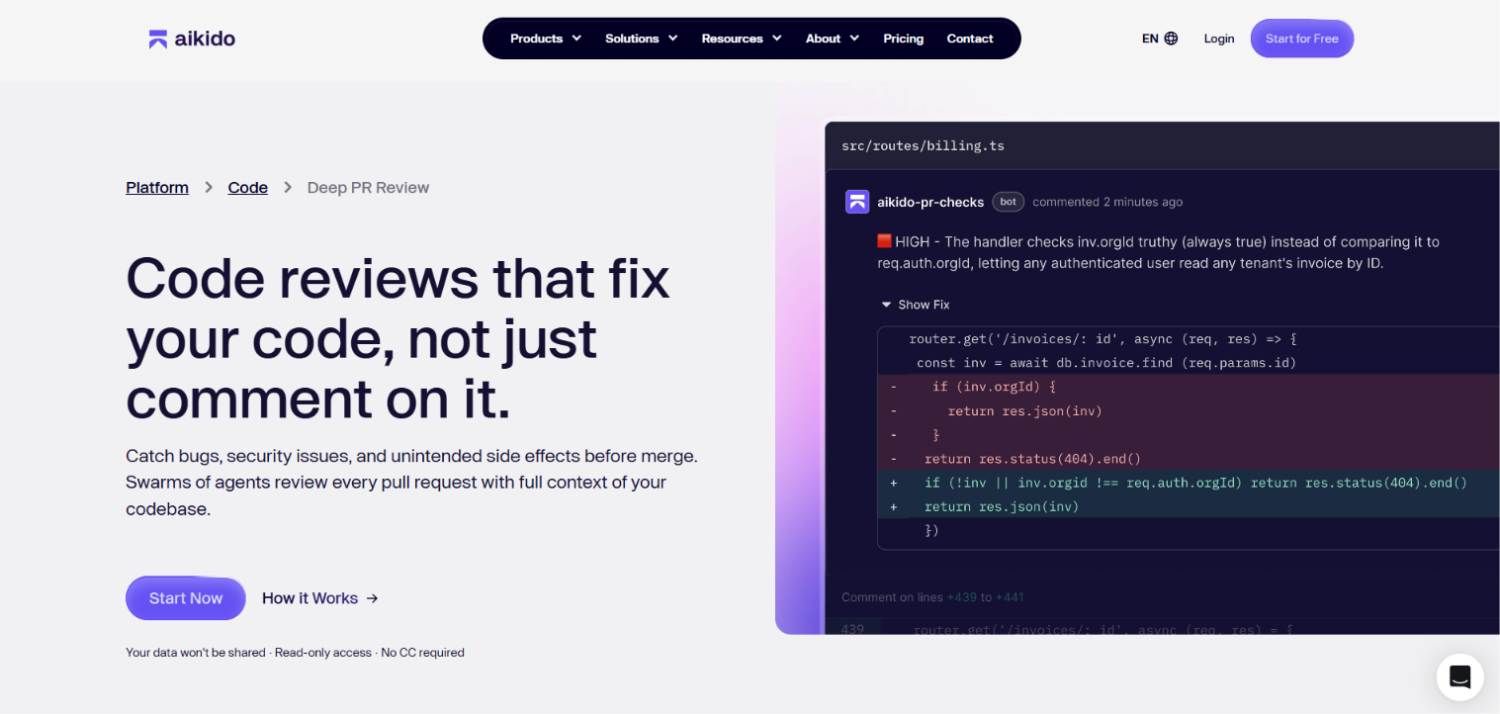
Aikido‘s Deep PR Review sends swarms of agents through every pull request with the full context of your codebase, looking for bugs, security problems and unplanned side effects ahead of the merge. Alongside it, Aikido has a separate Code Quality product that rates your repos.
Pros
- Looks at the whole repository instead of only the changed lines of the pull request.
- Looks at your codebase structure, related repositories, static scan results and even PR comments.
- Finds business logic flaws and privilege escalation paths that only appear when the application is viewed as a whole.
- Can be switched on for selected repos instead of everywhere at once.
- Connects with read-only access, so you can run it next to your current SAST.
What You Get
- Inline comments right on the pull request.
- Code quality ratings for each repo, covering maintainability, readability, performance and reliability.
- Hotspots that flag the files changing most often and collecting the most findings.
- AutoFix changes that developers review and merge, or that apply automatically above a threshold you set.
- Custom and predefined rules and style guides enforced on every pull request.
Why We Like It
Review and quality share one product, so there’s no second tool to stitch in. Plus, the comments are about how a change fits the whole app, and you can turn it on repo by repo to try it next to the checks you already have.
2. CodeRabbit
CodeRabbit reviews pull requests with AI and posts its feedback right on the PR, and it also reviews in the IDE and CLI. CodeRabbit says it has 17K customers.
Pros
- Picks up new pull requests on its own and refreshes its feedback when more commits land.
- Flags possible runtime errors, race conditions and logic flaws.
- Lets you reply to a review comment to ask for an explanation or a different approach.
- Draws on context beyond the diff, including feedback you give it, guideline files in the repo and linked issues.
What You Get
- Feedback posted on each pull request.
- One-click fixes that apply suggested changes to the PR.
- Reviews of changes you haven’t committed yet, in the IDE or CLI.
- Support for Azure DevOps, Bitbucket, GitHub and GitLab, with Jira and Linear for issues.
3. Greptile
Greptile calls itself an AI code reviewer, with agents that check and test pull requests while drawing on the full codebase. According to Greptile, 22,000+ teams use it.
Pros
- Builds a graph index of your repo covering files, functions and dependencies.
- Has a swarm of agents that check the impact of changes beyond the diff.
- Learns your coding standards by reading your engineers’ PR comments.
- Lets you write your own rules in plain English and enforce them on every PR.
What You Get
- Support for GitHub, GitLab and Bitbucket.
- Self-hosting with Docker Compose or Kubernetes, using your own AI model providers.
- TREX (beta), which tries out your PR branch inside a sandbox so bugs that appear only while the code runs get caught.
4. Qodo
Qodo presents itself as a platform for AI review and governance that checks pull requests and also works in the IDE. Qodo claims about an hour saved per pull request.
Pros
- Runs specialized review agents on every pull request.
- Flags bugs, rule violations and gaps against requirements.
- Picks up rules from how your code and past pull requests look, then applies them to each change.
- Uses Cross Repo Review to flag breaking changes that could affect other repos that depend on the code.
What You Get
- Findings on each pull request.
- The same review inside your IDE while you write code.
- Support for Azure DevOps, Bitbucket, GitHub and GitLab, with Gerrit on Enterprise.
- On-premises and single-tenant deployment options.
5. GitHub Copilot Code Review
Copilot code review is a feature of GitHub that looks over your code and suggests fixes, which makes it a natural step for teams already working in GitHub.
Pros
- Works on code in any language.
- Gathers full project context by analyzing your entire repository.
- Reads repository custom instructions so it can follow your team’s standards.
- Offers two review effort levels, Lite and Balanced, with Balanced as the default.
What You Get
- Feedback with suggested fixes that are ready to apply with a click or two.
- Reviews on GitHub.com, the GitHub CLI and GitHub Mobile, plus VS Code, Visual Studio, Xcode and JetBrains IDEs, with Azure DevOps in public preview.
- A review when you assign Copilot to a pull request, or automatic reviews that users, repo owners or org owners can turn on.
6. Cursor Bugbot
Bugbot is Cursor’s AI code review for pull requests. Cursor says 70%+ of Bugbot’s flags get resolved before merge.
Pros
- Checks pull requests for bugs, security problems and code quality concerns.
- Analyzes the PR diff and explains what it found.
- Starts by itself when a PR changes, or on demand when you comment “cursor review” or “bugbot run”.
- You can steer it with .cursor/BUGBOT.md files in your repo and with team rules.
What You Get
- Comments on the pull request that explain each finding and suggest a fix.
- “Fix in Cursor” links that open an issue directly in the Cursor editor.
- Connections to GitHub (including Enterprise Server), GitLab, Bitbucket and Azure DevOps.
7. Graphite
Graphite calls itself an AI code review platform, and its AI reviewer does its work on GitHub pull requests.
Pros
- Hunts for serious bugs and security problems ahead of production.
- Lets you write custom rules in plain language or start from templates.
- Has filters that let you say which kinds of comments it should not leave.
- Integrates directly with GitHub, with one-click authorization.
What You Get
- Comments on pull requests with one-click fixes you can commit straight from the PR.
- A wider workflow that includes stacked PRs, a merge queue and a PR inbox.
8. Sourcery
Sourcery is an AI reviewer for GitHub and GitLab, and it closes out the list with a straightforward approach.
Pros
- Reviews every pull request.
- Checks for logic mistakes, overlooked edge cases and security problems, with advice on fixing them.
- Can approve low-risk PRs that have no blocking findings.
What You Get
- A PR summary and review comments.
- Suggested changes that can be committed to the PR in one click.
- Support for GitHub and GitLab, including self-managed GitLab.
Final Choice
Every tool here reviews pull requests before they merge, so what you choose depends on how much of your code you want reviewed and where your team already works. Some tools focus only on review, others come attached to a platform you may already use, and a few keep things simple on purpose.
Not sure where to start? Check which Git platform you use, how much of the codebase you want read on each pull request, and how you’d like to teach the tool your rules. If you’d like review and code quality ratings in the same place, Aikido is worth a first look, since it reads the whole repo for each pull request and leaves its comments right in the pull request.